Welcome to GCDroid
create topics and leave suggestions for new feature
Willkommen zu GCDroid
erstelle Themen und hinterlasse Vorschläge für neue Funktionen

 Wear OS
This may be a niche area but it would be great if GC Droid supported Wear watches.
I have cached with Garmin watches and find a watchuseful when hiking or in urban areas. I now have a Wear OS watch and have been frustrated by the lack of options. Right now, Locus has only limited support for Wear, giving no ability to interact with the cache. Geooh Go supports Wear but the full app is generally convoluted. There used to be a wear app that provided the direction and distance to a cache but that is no longer in the play store.
Offline caching
I would like to do a live search and then save the resulting online database to an an offline database along with the full cache details including graphics associated with the cache.
The ability to download full graphics along with the cache details for all caches on a database is one area where Locus (or Cachly on iOS) has a distinct advantage. I have sometimes stopped for unplanned earthcaches, letterboxes, and field puzzles but had no way to access the full information without cell service.
It is the main thing that keeps me from using GC Droid as my main caching app — otherwise I love its inclusion of Wherigo support and ALs.

filter "bookmark list"
the idea of using colorTAG led me to the idea of using bookmark lists for filtering a group of caches and their subsequent color marking.
therefore the question about the development of a new filter according to the bookmark list

0.1mi Circles Compounding
When a cache is in "goto mode" and Waypoints are shown, the 0.1mi circles percentage is added/compounded together and obliterates the map.
I think it might be much better if it stayed at an equal percentage. (which I'd also like to vary if possible).
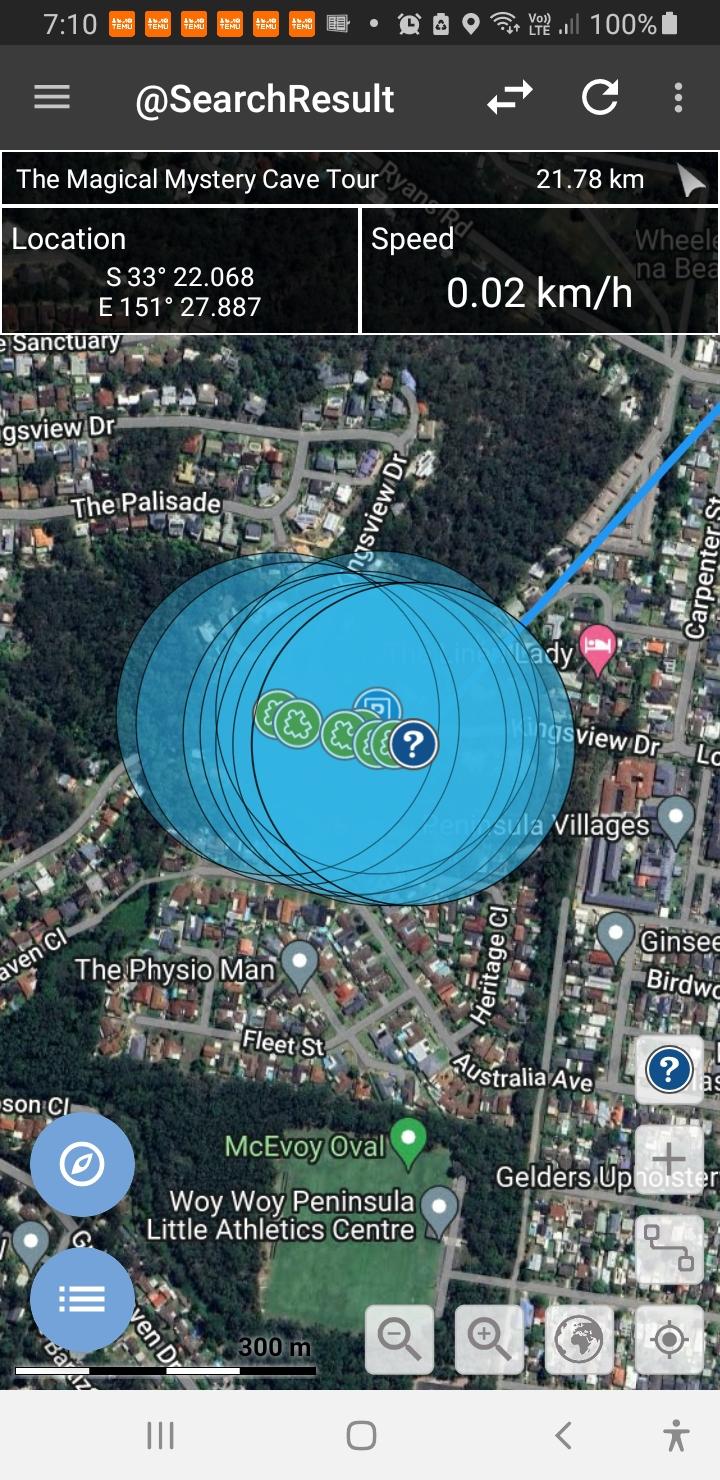


This is by design. I might or might not add it back. It required heavy modifications to the mapping library.
Zoom Out with 2 Finger Click
Could we have Zoom-Out with 2 finger tap on map screen please. Should make for much easier map use for those with big fingers or 10 thumbs.😁
Honestly, I do not see any issues with zoom.
But you can already do: one finger, double tap and drag.


Import from V2.
I wozld lije to have a import in V3 from the old V2 version.
Including all:
- settings
- DBs
- maps (deleting them in the old version).
Simply everything.
Thank you
Unfortunately, that is not possible due to Android limitations.
Here what you can do for maps and DBs:
You can copy the old data from either /GCDroid or /Android/data/com.gcdroid (depends on your settings) to /Android/media/com.gcdroid.sub
You might have to use PC since Android might restrict access to data folder.
Settings are app-private and not accessible in any way unfortunately.
Customer support service by UserEcho